








Proxifier Proxy-Integration
Diese Anleitung könnte veraltet sein. Eine aktuelle Anleitung finden Sie in unserer Dokumentation.
Was ist Proxifier?
Proxifier ist ein führender Proxy-Client, der Anwendungen, die keine Proxys unterstützen, ermöglicht, über SOCKS- oder HTTPS-Proxy und Ketten zu arbeiten. Er erleichtert die Umleitung verschiedener Internetanwendungen, einschließlich Browser, E-Mails, Datenbanken und Spiele, über einen Proxy. Er verbessert die Kontrolle über Unternehmensnetzwerke durch Remote-Updates und Zugriffskontrolle auf Ressourcen.
Zu den wichtigsten Funktionen von Proxifier gehört die Fähigkeit, Verbindungsgeschwindigkeiten durch schnellere Routen zu verbessern und eine leichte Alternative zu VPNs mit sicheren, verschlüsselten Kanälen zu bieten. Sein einzigartiges regelbasiertes System ermöglicht es Ihnen, verschiedenen Verbindungen unterschiedliche Proxys oder Ketten zuzuweisen, was traditionelle Einschränkungen übertrifft und bemerkenswerte Flexibilität gewährleistet.

So richten Sie Proxifier
mit Bright Data Proxys ein:

Eine Zone in Bright Data erstellen:
Starten Sie den Integrationsprozess mit Proxifier, indem Sie eine Zone gemäß Ihren Anforderungen erstellen. Für diese Anleitung erstellen wir eine ISP-Zone mit einer dedizierten IP. Stellen Sie sicher, dass Sie Ihre Zieldomains einschließen oder die Einstellung “Alle Domains” für das Targeting mehrerer Seiten wählen.
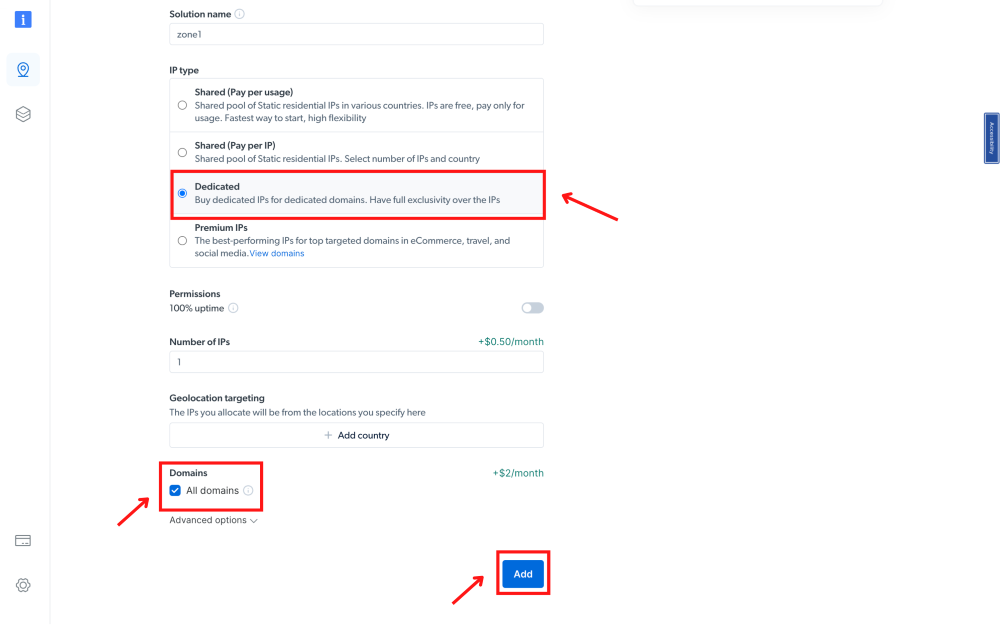
Beispiel Zonen-Konfiguration:
Werfen Sie einen Blick auf das beigefügte Beispiel.

Zugriffsparameter beschaffen:
Navigieren Sie zu Bright Data’s Proxies & Scraping-Infrastruktur, wählen Sie die erstellte Zone aus und holen Sie sich die Zugriffsparameter. Halten Sie diesen Tab geöffnet, da diese Zugangsdaten bald benötigt werden.
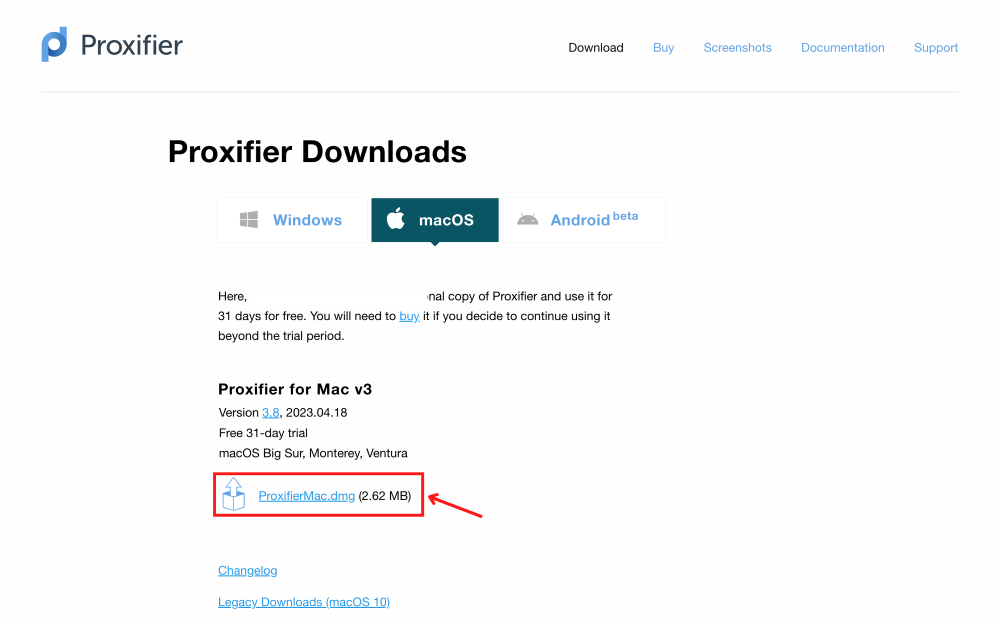
Proxifier installieren:
Laden Sie die für Ihr Betriebssystem geeignete Proxifier-Anwendung herunter und installieren Sie sie.

Auf Proxys zugreifen:
Klicken Sie in der Proxifier-Oberfläche oben rechts auf das Proxy-Symbol.

Proxys hinzufügen:
Klicken Sie auf die Schaltfläche ‘Hinzufügen’, um Proxys einzuschließen.

Proxy-Server und Port eingeben:
- Geben Sie den Server als brd.superproxy.io an
- Port als 33335 für Bright Data Proxys.

Protokoll wählen:
Wählen Sie im Abschnitt Protokoll ‘HTTPS’ aus.
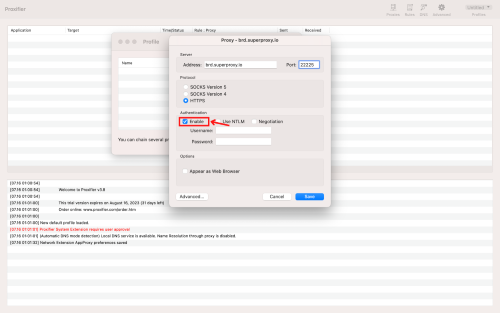
Authentifizierung aktivieren:
Aktivieren Sie das Kontrollkästchen ‘Aktivieren’ im Authentifizierungsbereich.

Proxy-Zugangsdaten kopieren:
Gehen Sie zurück zu Bright Data’s “Proxies & Scraping Infra”, wählen Sie die von Ihnen verwendete Proxy-Zone aus, klicken Sie auf die Option “Zugriffsparameter” und kopieren Sie den bereitgestellten Benutzernamen und das Passwort.

Proxy-Zugangsdaten in Proxifier eingeben:
Kehren Sie zu Proxifier zurück und fügen Sie die kopierten Zugangsdaten in die entsprechenden Felder ein, klicken Sie dann auf ‘Speichern’.

Standard-Proxy festlegen (Optional):
Bestätigen Sie das Hinzufügen des Proxys als Standard, wenn Sie eine sofortige Nutzung wünschen. Diese Einstellung kann später unter Profil->Proxifizierungsregeln geändert werden.

Browsen beginnen:
Öffnen Sie Ihren Browser. Der gesamte Traffic wird nun zum Proxy umgeleitet, sichtbar in den Protokollen.

Proxy-Nutzung überprüfen:
Um sicherzustellen, dass Ihr Bright Data Proxy verwendet wird, überprüfen Sie den Bereich Ereignisprotokoll in Ihrem Proxies & Scraping-Infrastruktur-Dashboard.
⚠️Wichtiger Hinweis! Wenn Sie Bright Data’s Residential-Proxys, Web Unlocker oder SERP-API verwenden, müssen Sie ein SSL-Zertifikat installieren, um Ende-zu-Ende-sichere Verbindungen zu Ihrer Zielwebsite(s) zu ermöglichen. Dies ist ein einfacher Prozess, siehe https://docs.brightdata.com/general/account/ssl-certificate#installation-of-the-ssl-certificate für Anweisungen.
Fazit
Abschließend ist die Einrichtung von Bright Data Proxys mit Proxifier eine einfache Möglichkeit, Ihr Online-Erlebnis zu verbessern. Mit der Fähigkeit von Proxifier, jede Internetanwendung über einen Proxy umzuleiten, und Bright Data’s sicherem Service gewinnen Sie mehr Kontrolle und Flexibilität. Diese Kombination bietet bessere Geschwindigkeit, Privatsphäre und ermöglicht es Ihnen, Ihre Internetaktivitäten einfach zu verwalten. Es ist eine kluge Wahl für alle Internetnutzer.
Proxys für Proxifier holen

Angetrieben von einem preisgekrönten Residential-Proxy-Netzwerk
Über 400M+ monthly residential IPs, erstklassige Technologie und die Fähigkeit jedes Land, jede Stadt, jeden Anbieter und jede ASN zu erreichen, machen unsere Premium-Proxy-Dienste zur ersten Wahl für Entwickler


Ein Proxy für jeden Entwicklungspfad
Kombinieren Sie Netzwerke, Peers und IPs, um Ihren kontinuierlichen Web-Datenfluss zu optimieren.


Proxy-Netzwerk-Preise


 Verwenden Sie AWS? Ab sofort können Sie über den AWS-Marktplatz bezahlen
 Der führende Anbieter von Proxies und Datenerfassung


Das beste Kundenerlebnis in der Branche!
Neue Funktionsveröffentlichungen jeden Tag
Um Fragen zu beantworten, wenn Sie sie benötigen
Echtzeit-Netzwerkleistungs-Dashboard
Um Ihre Leistung zu optimieren
Um Ihre Datensammelziele zu erreichen